Week 7: Building an MP3 Player : "Wiring Up" the Player
- Select the Actions layer and open the Actionscript Editor by pressing the F9 key or selecting Window>Development Panels>Actions.
- Click once in the input area of the Actions panel and enter the following code:
var playlistXML:XML = new XML();
playlistXML.ignoreWhite = true;
var music:Sound = new Sound();
var currentSong:String;
Because we are using an XML document, the first line of code creates the XML object - playlistXML- and the next line tells the XML object to ignore any extra spaces in the document.
The sound object - music- is then created and a variable- currentSong- is created to store the file name of the song selected in the List component.The String class is used because it is a collection of words.
The reason you need a variable is because simply selecting a song from the list won't cause it to load and play automatically. This only happens when the Play button is clicked.Thus the name of the last selected song is held only until the Play button is clicked and the file is loaded.
- Add the following code to the Actions editor:
playlistXML.onLoad = function(){
var tempArray = new Array();
for(var i = 0; i < this.firstChild.childNodes.length; ++i){
tempArray[i] = new Object();
tempArray[i].label = this.firstChild.childNodes[i].firstChild.nodeValue;
tempArray[i].data = this.firstChild.childNodes[i].attributes.URL;
}
playlist_lb.dataProvider = tempArray;
}
playlistXML.load("playlist.xml");
The last line is the important one: it loads the playlist.xml file into the the playlist XML object declared in the first line of code. Before that happens,though, you are going to have to tell the XML object what to do with the xml data when it is loaded. That is the purpose of the onload event and function that precedes that line of code.
Lists
This exercise pulls the data out of the XML document, puts it in a list and then fills the List component with the contents of the list. Before you do that, you have to understand the basics of a list.
A list is nothing more than individual pieces of data separated by a comma. For example, create a list of people in the class and you might see "Yuri,Taha,Celia,Rob, German, Tom, Amy, Stephanie". Unfortunately, the class list can't be used by Flash because Flash doesn't work with lists. It works with arrays . Arrays are lists that have been named.
The best way of understanding that concept is to think of a variable. In many respects, a variable is one piece of data with a name. When you have many pieces of related data it simply doesn't make sense to give each one a variable name. In this case you would use an Array. Arrays are data containers that hold data in a specific sequence. The sequence really doesn't matter, you create it.It is how Flash accesses the items that does.
The position of each item in the list is called its Index. Indexes are numbered sequentially, starting at 0 so that each item in the list has a unique index number. Now that this items have a number, they can be accessed by Flash just by referencing the index number.
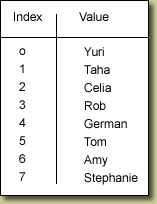
Image 4. The Class list can be accessed by Flash because each item in the list now has a corresponding index number.
The indexes of an array are referenced with a square bracket :
classList[4];
In this case the value for that index number would be "German". Those square brackets are known as array access operators. That statement above accesses the data located in the fourth position of an array named classList.
The number of entries in a list is what defines the length of an array. The number of entries is irrelevant which means I can have classList composed of 7,70 or even 700 items and still have access to each item in that list simply be referring to the list's name. What is also quite neat about arrays is that the data can be dissimilar. For example a list could be "Yuri,72,True " and Flash couldn't care less.
Creating a Flash array is a two-step process. The first is to use a constructor function to create or instantiate a new array from the Array class:
classList= new Array():
Then fill or populate the array with data. Therefore the classList array would be:
classList = new Array( "Yuri","Taha","Celia","Rob", "German", "Tom", "Amy", "Stephanie")
Now that you know how lists work, let's examine how we build one using the data in the XML document.
Next.... Writing Actionscript for lists

This work is licensed under a Creative Commons License.